Key Takeaways
- You can automatically turn research notes into a PPT within minutes using AI tools.
- AI helps convert rough ideas into a structured research presentation without manual formatting.
- AI tools help organize content into clear slides, improving clarity, flow, and audience engagement without needing design skills.
- Using the right tool saves time and ensures your presentation looks professional and polished.
With AI tools, you can now transform research notes into PPT automatically. Instead of starting from scratch, AI helps you structure, format, and design your presentation in minutes, allowing you to focus more on your ideas rather than formatting slides.
Why Convert Research Notes into a Presentation?
Before learning how to automate the process, it helps to understand why turning notes into slides matters.
- Focus on Key Ideas: Presentations help you highlight only the most important points instead of overwhelming your audience with raw data.
- Build a Clear Narrative: Slides allow you to organize your research into a logical storyline that is easy to follow.
- Improve Visual Communication: You can add visual elements like charts and images to your PPT to make your content more engaging and easier to understand.
- Increase Audience Engagement: Structured slides keep your audience attentive and interested throughout the presentation.
- Simplify Complex Information: Breaking research into slides makes difficult topics easier to digest.
- Gather Faster Feedback: Presentations allow you to share your ideas quickly and receive feedback in real time.
How to Automatically Convert Research Notes into PPT Using SlidesAI?
Instead of manually formatting every slide, you can use an AI-powered tool like SlidesAI to instantly convert your notes into PPT. Here is how the process works:
Step 1: Install SlidesAI on Your Platform
For the Web App: Open the SlidesAI web app and sign in to your account.
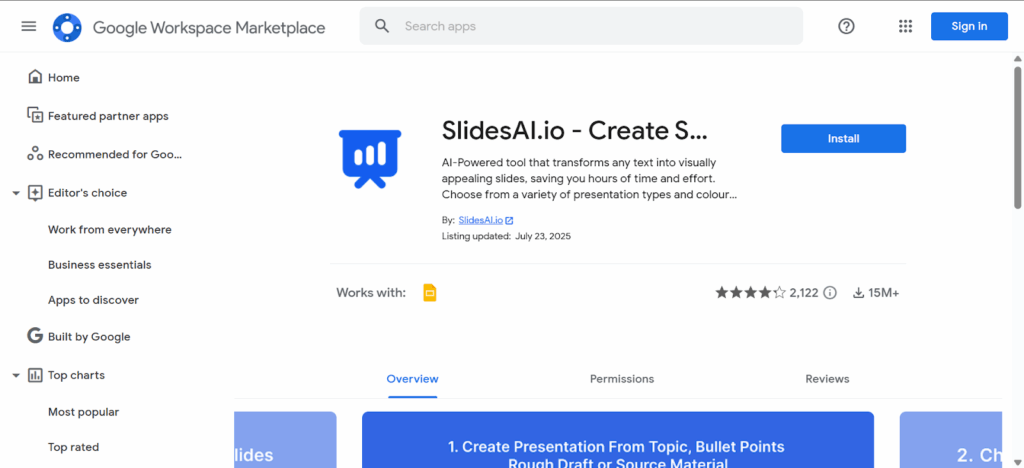
For Google Slides: Open a blank presentation, go to Extensions → Add-ons → Get Add-ons, and install SlidesAI.
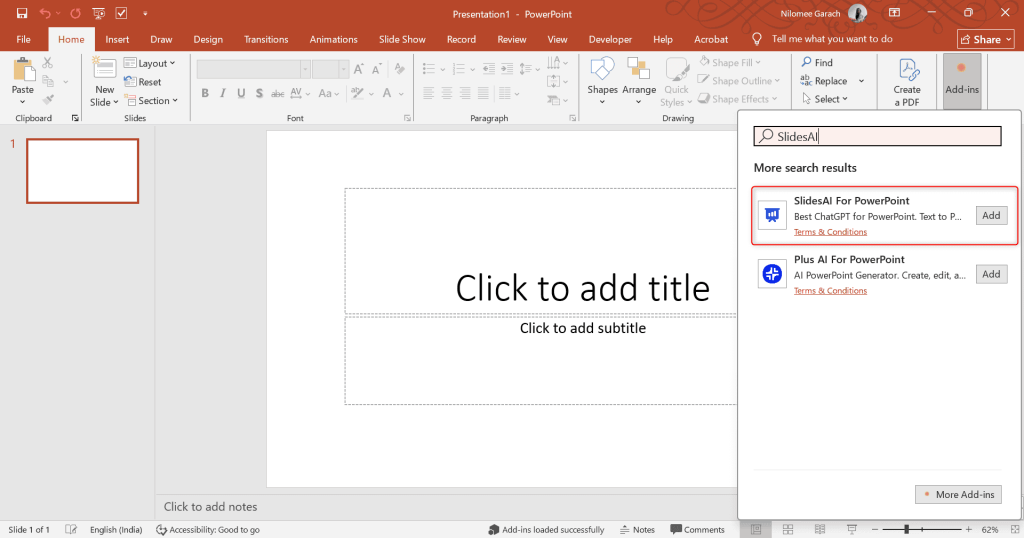
For PowerPoint: Open a presentation, go to Add-ins, search for SlidesAI, and install it.
Step 2: Start a New Presentation
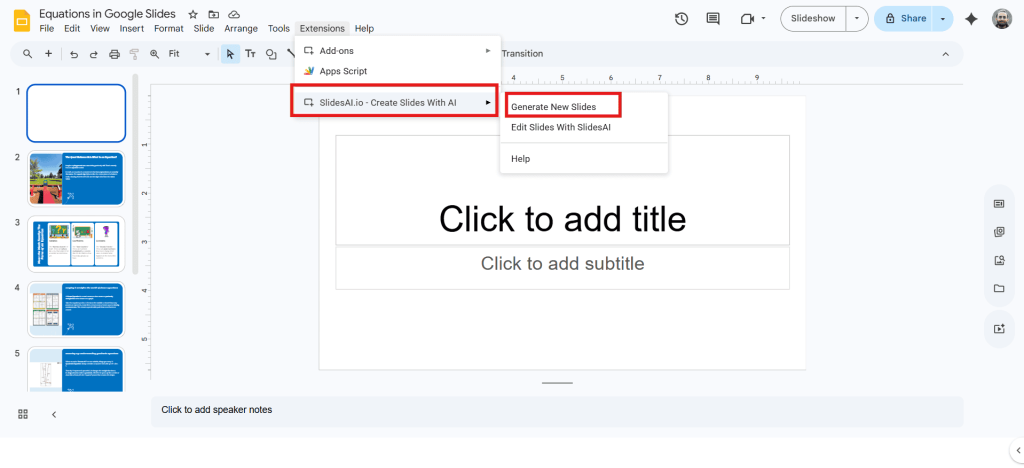
- Open SlidesAI from the toolbar and select the option to generate a new presentation.
- This step allows you to begin creating your research presentation from notes automatically.
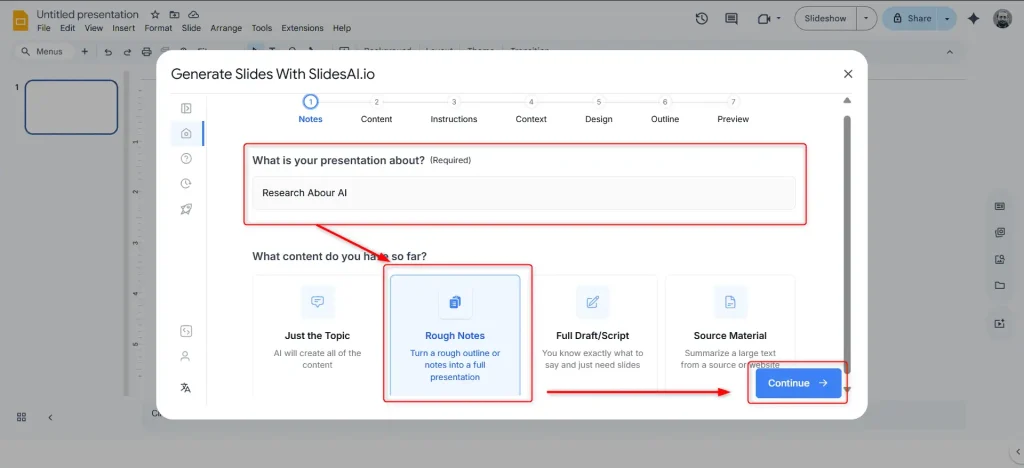
Step 3: Enter Your Topic & Choose “Rough Notes”
- Add your presentation topic.
- Select the “Rough Notes” option so the AI understands that you are working with unstructured content.
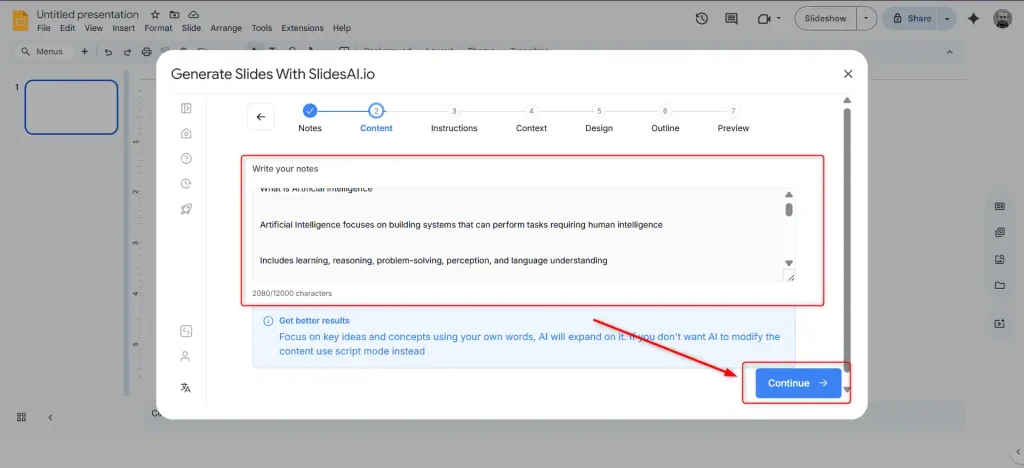
Step 4: Paste Your Research Notes
- Add your notes directly into the tool.
- Click continue so AI can begin processing your content.
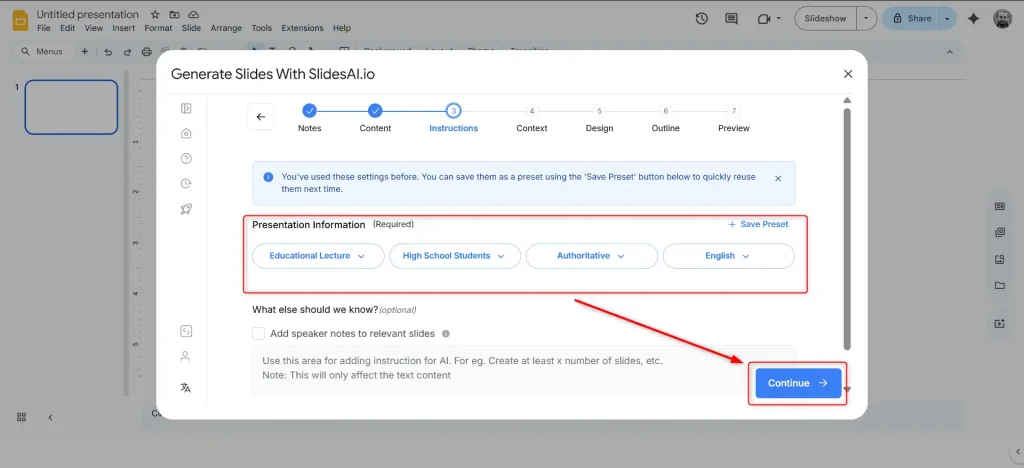
Step 5: Choose Presentation Settings
- Select the presentation type, audience, tone, and language.
- This ensures your research notes to PPT conversion matches your specific needs.
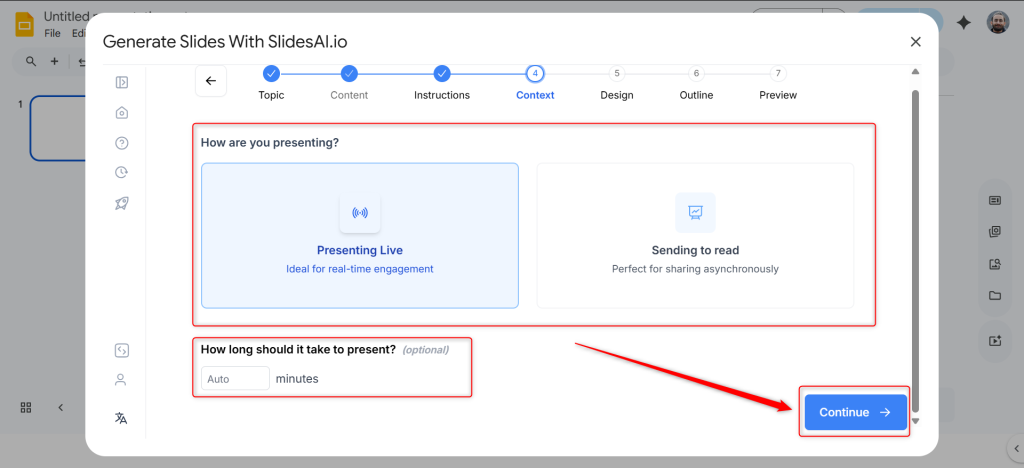
Step 6: Select the “Presenting Live” Mode
- Choose the presentation format for live delivery.
- This helps AI structure slides for clarity and flow during presentations.
Step 7: Review & Refine the Generated Content
- Let AI create a structured outline based on your notes.
- You can edit or refine it before moving forward.
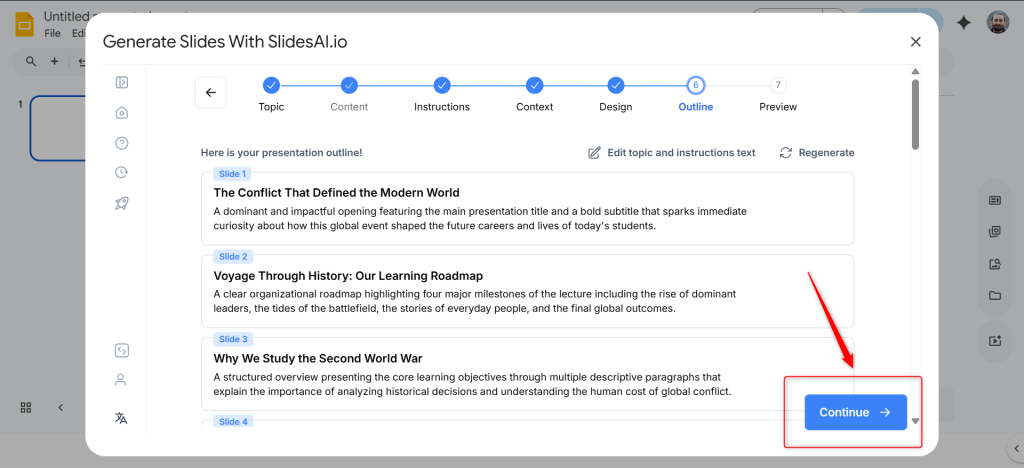
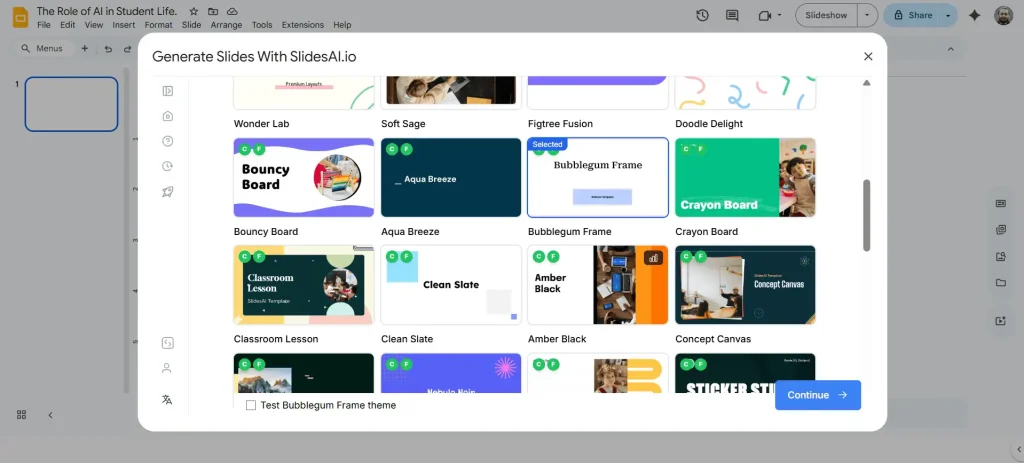
Step 8: Select a Template
- Choose a design template that fits your topic and audience.
- This step enhances the visual quality when you convert notes to PPT.
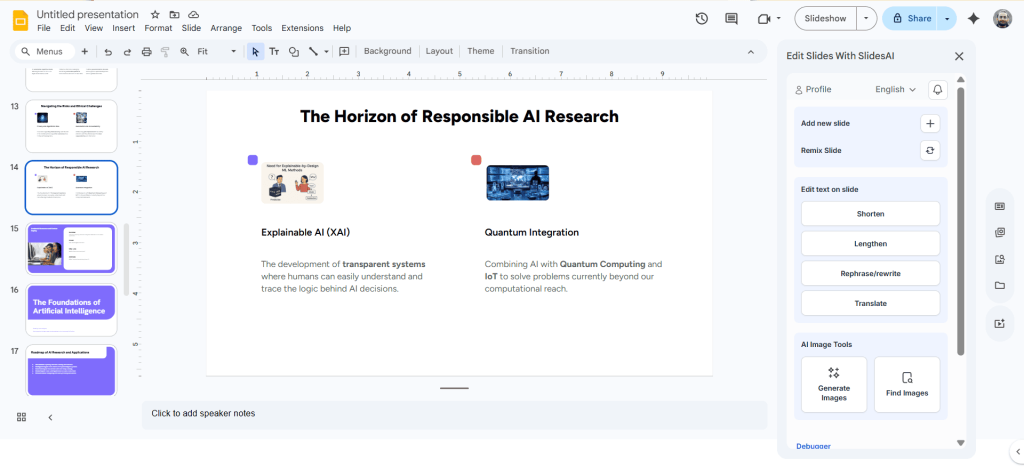
Step 9: Finalize Your Presentation
- Lastly, watch SlidesAI generate your complete presentation.
- Review the slides properly and make final edits before presenting or sharing.
<SlidesAICTA1 />
Conclusion
Turning raw notes into a structured presentation no longer has to be time-consuming. With SlidesAI, you can easily do this in just a few steps. So, now, instead of spending hours formatting slides, you can focus on refining your ideas and delivering a strong presentation!
FAQs
1. Can AI create a PowerPoint from research notes?
Yes, AI tools like SlidesAI can automatically convert research notes to PPT and export the presentation in .pptx format.
2. Do I need design skills to create presentations with AI?
No, AI tools are designed to help you create professional slides without any design experience.
3. How accurate are AI-generated presentations from notes?
The accuracy depends on how clear and structured your input notes are. Better input leads to better output. But it’s always advisable to review the content before presenting.
4. Can AI add visuals to a presentation from research notes?
Yes, many AI tools can suggest or include relevant visuals, icons, and images based on your content.
5. Can AI create presentations from Docs or Word files?
Yes, with tools like SlidesAI, you can import content from Google Docs, Word files, PDFs, or plain text.
6. How long does AI take to create a presentation?
Most AI tools generate a presentation within seconds or minutes, depending on the content length.
7. Can I edit the presentation after AI creates it?
Yes, AI-generated presentations are fully editable, so you can customize text, design, and layout as needed.
Related Posts
-

Converting text into a PowerPoint presentation is now easier than ever thanks to modern AI…
-
Turning meeting notes into a presentation might sound like a simple task, but it often…
-

Boring, text-only headings often fade into the background and fail to grab attention in PowerPoint…
-

Speaker notes in Google Slides can be a valuable tool for improving your presentations. They provide a way to add…
-

Whether you’re preparing a pitch deck, a client presentation, or repurposing existing content, converting your…