If you’re in the event space, you already know how much time and effort goes into crafting presentations that wow a crowd. From client pitches to stage visuals, the pressure to make things look sharp is real. But the truth is, you don’t always have hours to spend designing slides from scratch. That’s where AI comes in. These smart tools can help you build stunning, on-brand decks in minutes, so you can focus more on the event itself and less on formatting text boxes. In this blog, we’ll walk you through the best AI presentation makers built to make your job easier. Let’s get started.
What Makes an AI Presentation Maker Ideal for Events?
Here are some features that make an AI presentation maker ideal for events:
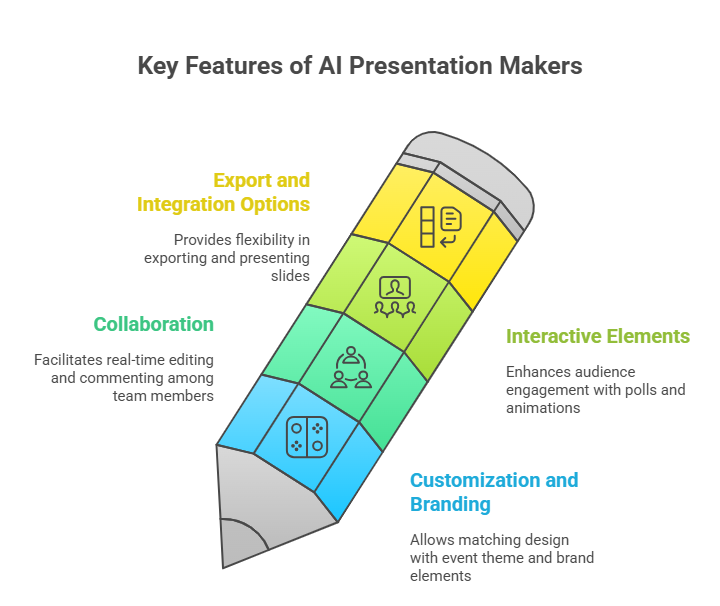
1. Customization and Branding
Your presentation should look like it truly belongs to your event. The best AI tools let you match the design with your event theme, sponsor logos, and brand colours. This makes your slides feel consistent and professional, leaving a stronger impression on your audience.
2. Collaboration
Events often involve multiple speakers or teams working together. A solid AI presentation tool should make it easy to collaborate in real time. Everyone should be able to edit, comment, and update slides without confusion or delays.
3. Interactive Elements
A great presentation doesn’t just talk to the audience; it involves them. Features like live polls, audience Q&A, or simple animations make the session more engaging. These elements encourage participation and keep the audience tuned in from start to finish.
4. Export and Integration Options
Lastly, flexibility matters. You should be able to export your AI-generated presentation to PowerPoint or PDF, or even present directly from the tool. This makes event workflows smoother and ensures your slides look sharp, no matter how or where you present.
Top AI Presentation Makers for Events
| Tool | Best For (Event Focus) | Main Features | Integrations / Export Options | Collaboration and Pricing Plans |
|---|---|---|---|---|
| SlidesAI | Ideal for conference sessions, academic lectures, and corporate presentations where quick content generation is needed. | Converts plain text or outlines into slides instantly. Offers automatic content summarization, smart color themes, and multiple presentation styles for business or educational use. | Works as an add-on within Google Slides and PowerPoint, allowing direct export or edits. | Collaboration depends on the host platform (Google Slides or PowerPoint). Offers a freemium plan with premium upgrades for advanced AI tools. |
| Canva | Great for visually rich marketing decks, promotional events, or social media-driven campaigns. | Comes with a massive library of templates, AI-driven design tools such as Magic Design, Magic Animate, and Magic Write, along with access to millions of stock photos and icons. | Allows export in PPT, PDF, or video formats. Can publish directly to social media platforms. | Provides real-time collaboration with commenting and brand management tools. Has a free plan, with paid Pro, Teams, and Enterprise options for extended features. |
| Gamma | Best suited for startup pitch decks or modern storytelling presentations that need a sleek, mobile-responsive layout. | Offers AI design support that can build an entire deck from an idea. Uses a card-based structure and supports flexible formatting. | Supports export to PowerPoint, PDF, and Google Slides. API access is available for automation. | Supports live collaboration. Starts with a free plan, with premium tiers available for businesses. |
| Beautiful.ai | Perfect for corporate events and brand-controlled presentations that require design consistency. | Uses AI to auto-adjust layouts, ensuring all slides stay aligned with brand guidelines. Includes tools for data visualization, viewer analytics, and team slide libraries. | Integrates with PowerPoint, Slack, Salesforce, Dropbox, Webex, and ChatGPT. Exports to PDF or PPT. | Enables browser-based collaboration with shared templates and branding control. Offers paid plans with a free trial. |
| Plus AI | Tailored for professionals creating internal or client decks directly in Google Slides or PowerPoint. | Converts documents into presentations, rewrites and formats slides using AI, and supports auto-generation of charts and images. | Integrates primarily with Google Workspace, Docs, and Slides, and allows export to PowerPoint. | Uses built-in collaboration tools from Google. Comes with a free trial, followed by subscription-based paid plans. |
| Adobe Express | Best for event managers who need to design not just slides but also posters, invites, and promotional material. | Features Adobe’s Firefly generative AI tools, quick editing options like background removal and resizing, and a wide template collection. | Integrates seamlessly with Photoshop, Illustrator, and Adobe Stock. Supports PDF export and direct scheduling to social media. | Allows real-time commenting and sharing. Includes a free starter plan and premium plans for professionals and teams. |
| Pitch | Designed for business pitches, investor decks, and collaborative event presentations. | Offers brand-aligned templates, remote control features for multiple presenters, and slide progress tracking. | Exports to standard formats such as PPT and PDF. Also supports cloud-based presentation sharing. | Enables team collaboration with task assignment and live commenting. Offers a free basic plan and Pro/Enterprise options. |
| Prezi | Best for storytelling presentations during keynote sessions or workshops that need a non-linear flow. | Features a zoom-based interface that allows smooth transitions between topics, plus video recording and analytics tools. | Supports export to PDF and video and connects with major video conferencing platforms. | Offers real-time editing, team comments, and Slack notifications. Includes a basic free plan and Plus, Premium, and Teams paid versions. |
| Visme | Ideal for training sessions, corporate reports, and data-driven presentations. | Provides over 900 slide layouts, strong data visualization tools, and interactivity features like pop-ups and hover effects. | Supports exports to PPT, PDF, HTML5, video, or image, and integrates with Google Sheets for live data updates. | Allows team collaboration and asset sharing. Offers a free plan and paid Starter, Pro, and Teams versions. |
| Slidebean | Made for startups and marketing teams that want fast, professional decks with minimal design effort. | Automatically designs slides based on written content, tracks presentation analytics, and offers templates focused on investor decks. | Exports easily to common formats and supports online sharing. | Offers online collaboration and role-based access. Includes a free plan and Essential or Premium upgrades. |
| Presentations.AI | Suited for executives and teams needing instant slide creation from long documents or notes. | Converts text or PDFs into ready-to-present decks. Handles layout, color, and style automatically. Includes built-in review tools and team workspace. | Allows export and online sharing. Primarily used as a digital presentation hub. | Offers a shared workspace with task assignments and guest editing. Likely follows a free and paid tier structure. |
| SlidesGo | Great for educators, event organizers, and social content creators looking for beautiful templates. | Offers AI tools for lesson plans, quizzes, and engagement activities, along with a huge library of themed templates. | Works within Google Slides, PowerPoint, or Canva as a resource platform. | Uses the host platform’s collaboration tools. Provides free templates with premium access for full library use. |
| Decktopus | Best for sales events, webinars, and lead generation presentations that require audience feedback. | Includes an AI assistant for creating slides, notes, and Q&A sections, along with branding and analytics features. | Exports to PDF, and connects with Zapier, webhooks, and custom domains. | Allows team management, template sharing, and live edits. Has a free trial and Pro, Business, and Enterprise plans. |
| Designs.ai | Perfect for creators or marketing teams who need fast, AI-driven designs across multiple media types. | Uses AI to build templates, generate visuals, resize content, and create presentations with consistent branding. | Allows saving of brand assets and templates. Integration details vary by plan. | Offers team collaboration through shared assets and file management. Available in Pro and Enterprise paid plans. |
1. SlidesAI – Best Overall for Event Presentations
If you’re looking for something quick, clean, and reliable, SlidesAI is easily one of the best AI presentation makers available today. It’s built to help you create polished slides from plain text with almost no effort. You just input your content, and SlidesAI handles the formatting, layout, and design for you.
Perfect for event organizers, speakers, and professionals, SlidesAI helps you save time while maintaining a sharp, consistent look. It works directly with Google Slides and PowerPoint, so you can edit or present without switching platforms. You can even add your own branding, like logos and themes, to keep everything aligned with your company or event vibe. Whether it’s a quick pitch or a detailed report, SlidesAI keeps your slides professional and on point.
Key Features:
- Instantly turns text into structured presentations
- Works with Google Slides and PowerPoint
- Lets you upload documents for faster content input
- Supports company branding and logos
- High character input limit per deck
Pricing Plans:
- Basic (Free): 12 presentations/year, 2500 characters per presentation, 120 AI credits/year
- Pro ($8.33/month billed annually): 120 presentations/year, 6000 characters per presentation, 600 AI credits/year
- Premium ($16.67/month billed annually): Unlimited presentations, 12000 characters per presentation, 1200 AI credits/year, enhanced video export
Best For:
Educators, professionals, students, and event organizers who want fast, high-quality presentations with minimal design work.
2. Canva
Canva is known for its simple drag-and-drop interface, and its AI-powered presentation maker is no different. If you need slides that look visually rich and modern, Canva is a solid choice. It’s packed with templates, graphics, and design tools that make it easy to create standout event decks even if you’re not a designer.
You can add photos, videos, animations, and custom branding with just a few clicks. It also allows real-time collaboration, so your whole team can pitch in while building the slides.
Key Features:
- Huge library of templates and design elements
- AI tools for resizing, background removal, and translation
- Team collaboration tools
- Brand kits for consistent presentation style
- Multiple presentation modes and sharing options
Pricing Plans:
- Free: Basic tools and templates
- Pro ($12.99/month per user): Premium assets, brand kits, and AI features
- Teams ($14.99/month for 5 users): Advanced collaboration and asset controls
Best For:
Freelancers, entrepreneurs, teachers, and event planners who want flexibility and visual appeal.
3. Gamma
Gamma is ideal for events where you need to mix storytelling, charts, and media into a sleek presentation. It lets you build slides from text, links, or even audio. This flexibility makes it easy to bring in different content types without switching tools.
You can also create landing pages and data visualisations directly within your slides, which is great for pitches or product demos during events.
Key Features:
- Create presentations using text, audio, or URLs
- Add charts directly into slides
- Unlimited deck creation in higher plans
- Includes tools for web-based content
Pricing Plans:
- Free: 400 lifetime credits
- Plus: $10/month (billed annually)
- Pro: $20/month ($15/month billed annually) for more tools and branding
Best For:
Content creators, marketers, and event presenters who need flexibility and interactive features.
4. Beautiful.ai
If your focus is on sharp, business-style presentations, Beautiful.ai is a good match. It helps you create clean, well-designed slides without messing with layouts or fonts. Just choose a smart template and drop in your content.
With tools like DesignerBot and shared slide libraries, it’s a favorite among corporate teams and professionals presenting at formal events. It also has strong admin and security controls for larger teams.
Key Features:
- Smart slide templates with AI design assistance
- DesignerBot automates layout and formatting
- Shared libraries and collaboration tools
- Admin controls and security features
Pricing Plans:
- Free: Basic features
- Pro ($12/month billed annually): Unlimited slides, access to DesignerBot
- Team ($40/month per user): Collaboration features
- Enterprise: Custom pricing
Best For:
Business professionals, corporate teams, and conference presenters who want polished, consistent decks.
5. Plus AI
Plus AI is a no-fuss presentation tool that lets you create professional decks in minutes. It comes with clean templates, simple AI-powered slide creation, and the flexibility to brand your slides your way.
It’s especially helpful for freelancers, small teams, or educators who want affordable AI help for regular events or lectures.
Key Features:
- AI-powered slides with pre-built templates
- Supports custom branding
- Simple collaboration features
Pricing Plans:
- $10–$30/month: Plans vary by number of presentations and features
- Free trial available for all plans
Best For:
Teachers, freelancers, and business users looking for affordable, quick-turnaround decks.
6. Adobe Express
Adobe Express brings in the visual magic. It offers a mix of AI and design tools to create media-rich presentations. If your event presentation needs images, videos, animations, or custom editing, this platform gives you full creative freedom.
With access to Adobe Stock, background removal tools, and animation presets, it’s perfect for creating standout slides with a professional finish.
Key Features:
- Animation presets and drag-and-drop editing
- AI-generated media assets
- Background removal
- Access to Adobe Stock’s media library
- Real-time co-editing
Pricing Plans:
- Free: Basic features and limited AI tools
- Premium ($49.99/year): Full template access, advanced tools, no watermarks
Best For:
Event organizers, designers, and marketers who want rich media content and professional design tools.
7. Pitch
Pitch blends AI with team collaboration, making it useful for startups or small teams preparing for events. It supports interactive content like videos, embeds, and custom fonts.
Its interface is clean, and the version control and role management tools make it easy for teams to stay organized.
Key Features:
- AI slide creation with real-time editing
- Upload videos and interactive content
- Workspace roles and version history
- Branded exports
Pricing Plans:
- Free: Up to 5 members
- Pro ($26/month for 2 editors): More AI credits and sharing tools
- Business ($104/month for 5 editors): Full collaboration features
- Enterprise: Custom plans
Best For:
Startups, small teams, and professionals working together on event decks and workshop content.
8. Prezi
Prezi takes a different approach. Instead of traditional slides, it uses zoom-based transitions to let you move through content like a visual map. This is great for events where you want to keep the audience’s attention and tell a story.
It also supports video, offline access, and presenter tools that help you stay on track during live presentations.
Key Features:
- Zoom-style dynamic navigation
- Offline presentation access
- Video recording and presenter notes
- Analytics and premium media options
Pricing Plans:
- Free: Basic features
- Plus ($15/month): Full access, offline support
- Premium ($25/month): All features with training and analytics
- Teams ($39/month): Admin tools and collaboration
Best For:
Teachers, public speakers, and anyone looking to deliver a more engaging, story-driven presentation.
9. Visme
Visme is a flexible design tool that lets you build presentations, infographics, reports, and even animated content. It’s perfect for events where you need visually impressive slides backed by real data. The drag-and-drop interface is easy to use, even if you’re not a designer. Visme’s AI helps you generate slides with charts, icons, and multimedia elements, so your content stands out. It’s a solid pick for marketers, educators, and business professionals who want their event decks to look sharp and professional.
Key Features:
- AI-generated slides and design elements
- Presenter Studio to record and share presentations
- Tools for creating charts, diagrams, and widgets
- Real-time collaboration
- Access to a large library of stock images and icons
Pricing:
- Basic: Free with 10 AI credits per month
- Starter: $12.25/month (billed annually) with 200 AI credits
- Pro: $24.75/month (billed annually) with 500 AI credits
- Enterprise: Custom pricing with unlimited AI credits
Best For:
Designers, marketers, educators, and teams creating data-driven, visually engaging presentations for events.
10. Slidebean
Slidebean is all about speed and simplicity. It’s built mainly for startups and professionals who need clean, investor-ready presentations without wasting time on formatting. Just drop in your content, and the AI handles the layout and design.
This is especially useful for pitch decks, product demos, or event presentations where you want everything to look sharp but don’t want to tinker with fonts and alignments. It also offers analytics, so you can see how your audience interacts with your slides.
Highlights:
- AI-powered slide design automation
- Built-in collaboration and sharing features
- Templates for pitch decks and financial models
- Presentation analytics
- Export to PDF and HTML
Plans:
- Starter: $7/month for core features
- Accelerate: $42/month for advanced features
- Both plans are billed annually.
Best for:
Startups, entrepreneurs, and professionals preparing for investor pitches, workshops, or conferences.
11. Presentations AI
Presentation AI is focused on helping you build smart, branded presentations in less time. It uses AI credits to generate slides and personalize them based on your content and brand. This tool is great for business teams who want consistency across decks and need built-in performance tracking.
Key Features:
- AI slide creation with a credit system
- Custom fonts and brand syncing
- Team collaboration tools
- Analytics to track presentation impact
Pricing:
- Starter: $0 for a limited time.
- Pro: $198/year
Best For:
Professionals and teams who need data-backed, branded presentations for business events and client meetings.
12. SlidesGo
SlidesGo is perfect if you want high-quality templates without paying a lot. It offers a wide variety of professionally designed templates for Google Slides and PowerPoint. These templates are customisable, and AI features help speed up slide creation and styling.
This is a good option if you’re working on a tight schedule or budget but still want your slides to look polished and on-theme. It’s also very beginner-friendly.
Key Features:
- 100% free and premium templates
- AI tools for slide generation
- Works with Google Slides and PowerPoint
- Templates for both business and education
Pricing Plans:
- Free: 3 presentations per month
- Premium: $3/month per user, discounts for teams (annual plan)
Best For:
Students, educators, event planners, and professionals who need quick, high-quality slides without heavy design work.
13. Decktopus
Decktopus is designed for speed. It helps you build presentations quickly using AI content suggestions and simple slide automation. You can customise templates, export to PDF, and even generate AI images to enhance your slides.
It’s a handy tool for people who present often and want a no-fuss way to put together clean, clear slide decks in a short time.
Key Features:
- AI slide creation using credit system
- PDF export and template customisation
- Built-in image generation
- Productivity tools for faster editing
Pricing Plans:
- Free: 20 AI credits
- Pro ($14.99/month): Extra credits and features
- Business ($34.99/user/month): Advanced features and branding
- Enterprise: Custom pricing
Best For:
Freelancers, trainers, and businesses that need fast, AI-generated presentations for ongoing meetings and events.
14. Designs.ai
If you want more than just presentations, Designs.ai offers a full creative suite. It helps you create presentations, logos, videos, voiceovers, and branded content—all powered by AI.
It’s great for marketing teams and agencies who need to build a full event experience, not just slides. The branding tools keep everything consistent, and the platform gives you plenty of creative control without needing multiple apps.
Key Features:
- AI presentation and branding tools
- Video editing and logo creation
- Voiceover generator
- Centralised creative asset hub
- Team collaboration tools
Pricing Plans:
- Basic ($19/month): Standard features
- Pro ($49/month): More assets and tools
- Enterprise ($169/month): Full suite with advanced features
Best For:
Agencies, marketing teams, and content creators who want an all-in-one tool to manage presentations and other creative content for events.
What Kind of Presentation Should You Create for Events?
When you’re putting together a presentation for an event, it really depends on your role, your audience, and what you want to achieve. Here are some common types of event presentations and how AI can make the process smoother:
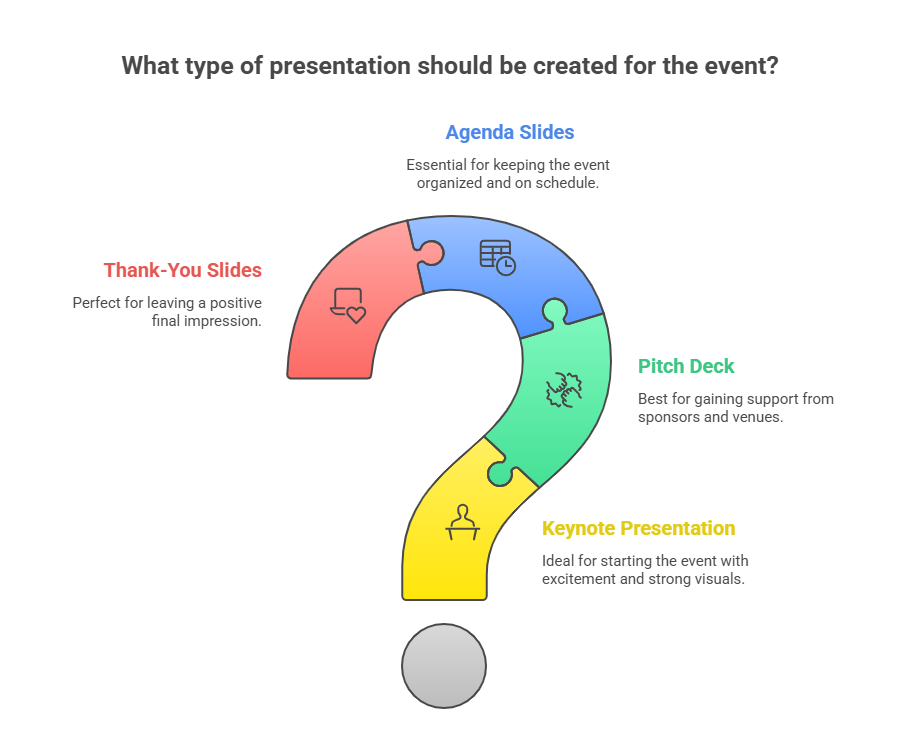
1. Keynote Presentations
These are meant to kick off the event and get people excited or thinking.
AI can help you shape a good story, suggest strong visuals, and make sense of any complex data you want to show.
2. Pitch Decks for Events
These are useful when you’re trying to get support from sponsors, explain your event idea to a venue, or get others on board.
AI can help build clean, convincing slides with the right mix of visuals and facts.
3. Agenda and Schedule Slides
These slides keep things on track and help your audience know what’s happening when.
AI can help format the schedule neatly, add icons for clarity, and make sure everything looks organised.
4. Thank-You or Closing Slides
These come at the end and are your chance to leave a good final impression.
AI can help you write quick summaries, pick out event highlights, and create slides that feel genuine and appreciative.
Closing Thoughts
Creating event presentations no longer has to be a long or tiring process. With so many AI tools out there, you can now build clean, ready-to-share slides in minutes. Whether you’re preparing a pitch, a keynote, or just a thank-you note, there’s a tool on this list that can help you get it done faster and better. Focus on your event, your story, and your audience. Let AI handle the design and structure.
<SlidesAICTA1 />
Explore AI Presentation Tools by Use Case
Every presentation serves a different purpose. A sales pitch, financial report, classroom lesson, or product launch each requires its own structure, narrative approach, and set of features. To help you choose the right tool quickly, we’ve created focused guides tailored to specific roles, industries, and use cases.
Explore the detailed comparisons below to find the AI presentation maker that best fits your needs.
- Best AI Presentation Makers Tools
- Best AI Presentation Tools for Businesses & Startups
- Best AI Presentation Makers for Finance Teams
- Best AI Presentation Makers for Product Launch Success
- Best AI Presentation Makers for Sales Professionals
- Best AI Presentation Makers for Marketing Teams
- Best AI Presentation Tools for HR Teams
- Best AI Presentation Tools for Students
- Best AI Presentation Tools to Create Lesson Plan Slides
Each guide focuses on real-world workflows, must-have features, pricing, and who the tools work best for, so you can choose confidently without wasting time testing everything yourself.
Frequently Asked Questions (FAQs)
1. Are AI presentation makers suitable for non-designers?
Yes, they are. These tools are built to be simple and user-friendly, so even if you have no design or tech skills, you can still create great-looking presentations. Most tools guide you with prompts, templates, and smart suggestions that make the process smooth and stress-free.
2. What features help engage event audiences?
Look for features like real-time polls, live Q&A, animations, and interactive storytelling. These elements keep your audience involved and help you get instant feedback during the event.
3. Can I export AI-generated slides to PowerPoint and use Presenter View?
Yes, most popular tools like SlidesAI, Plus AI, Beautiful.ai, Slidebean, and Presentations.AI allow you to export your slides to PowerPoint. They usually work well with Presenter View too. Still, it’s a good idea to double-check the export features on the tool’s official site, just in case there are any limits.
4. Do these tools help with speaker notes and rehearsals?
Many of them do. They can generate speaker notes or slide summaries for you. If you’re looking for features like auto-advance or a built-in teleprompter for rehearsals, some tools offer that too. Others might require you to use PowerPoint after exporting your slides.
5. Are AI presentation makers suitable for large-scale events with hundreds of slides?
Some platforms are made to handle big presentations without slowing down. If your event requires a large deck, make sure to check how well the tool performs and whether it can manage that kind of load before you dive in.
6. How accurate is the AI in generating content?
AI has come a long way, but it’s not perfect. You should always review what it creates to make sure the content is accurate and fits your message. A quick proofread can make a big difference.
Related Posts
-

Creating presentations with AI tools has become faster and easier than ever. AI presentation makers…
-

Presentation aids are tools that speakers use alongside their words and delivery to help get…
-

SlidesAI is a Google Workspace Add-on (think of it like a Chrome Extension but only…
-

Creating presentations has long been a time-consuming task, one that demands both creativity and technical…