Key Takeaways
- ASWOT analysis presentation turns strategic insights into clear, visual discussions that support smarter decision-making.
- Separating internal factors (strengths and weaknesses) from external factors (opportunities and threats) helps teams think more objectively.
- Effective SWOT slides focus on clarity over clutter, using concise bullet points and simple visuals.
- A strong SWOT presentation goes beyond observation by connecting insights to actionable outcomes.
- Thoughtful design choices, like readable fonts, balanced colors, and minimal animations, improve engagement and understanding.
Creating a SWOT analysis presentation is not just about filling four boxes on a slide. When done right, it becomes a powerful way to clarify strategy and guide smarter decisions. A well-structured SWOT slide helps everyone see the bigger picture quickly and clearly, including the leadership, clients, and your marketing team.
This guide walks you through what a SWOT analysis in a presentation is, why it matters, what to include, and how to create slides that are clear, persuasive, and easy to act on.
What is a SWOT Analysis?
A SWOT analysis is a strategic framework used to evaluate “Strengths, Weaknesses, Opportunities, and Threats” related to a business, project, product, or idea. Strengths and weaknesses focus on internal factors you can control, while opportunities and threats come from external conditions such as market trends or competition.
When presented visually in a SWOT analysis presentation slide, this framework helps audiences understand complex situations at a glance and supports more informed discussions.
Why is a SWOT Analysis Presentation Important?
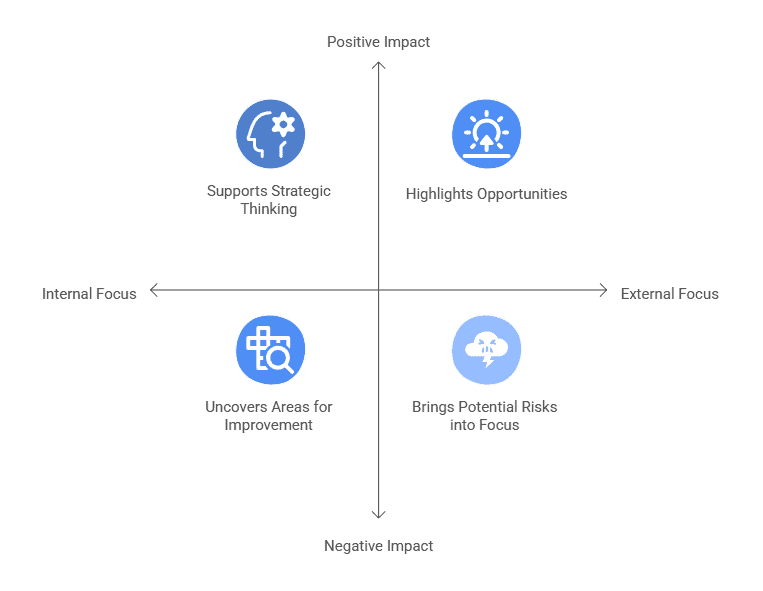
Before you begin to learn how to present a swot analysis, you must know why it is so critical. Basically, this analysis helps turn raw observations into clear insights in the following ways:
-
Helps Uncover Areas That Need Improvement
A SWOT analysis makes internal gaps more visible. By clearly outlining weaknesses, your teams can prioritize what needs fixing and avoid ignoring issues that could slow growth or performance.
-
Highlights Opportunities Worth Acting On
Presenting opportunities visually helps to spot trends, unmet needs, or market gaps faster. This clarity supports proactive planning instead of reactive decision-making.
-
Brings Potential Risks Into Focus
Threats are easier to address when they are clearly stated. A SWOT analysis presentation or PPT allows stakeholders to discuss risks openly and plan mitigation strategies before problems escalate.
-
Supports Strategic Thinking and Alignment
By putting all four elements together, a SWOT analysis encourages balanced thinking. It helps teams weigh positives and negatives together, leading to more thoughtful and aligned decisions.
What Should SWOT Analysis Presentation Slides Include?
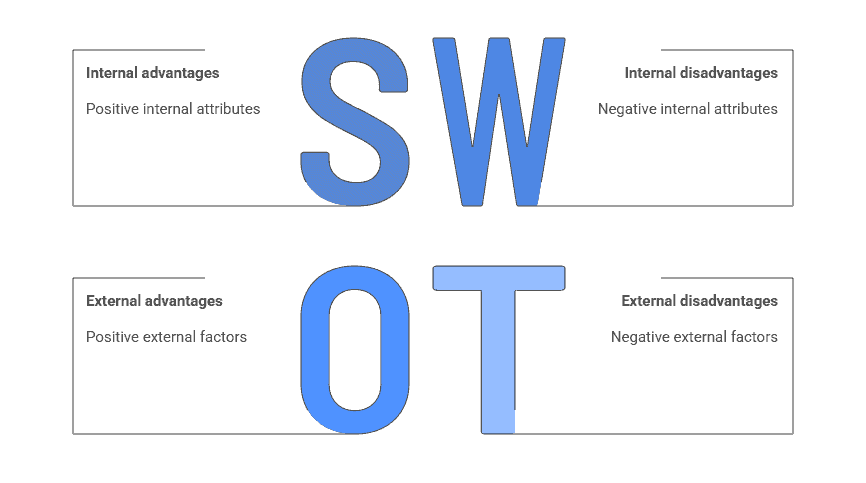
A strong SWOT slide is simple, focused, and purposeful. Each section communicates only the most relevant points.
-
Strengths
This section highlights what the organization or project does well. It may include unique capabilities, strong brand presence, skilled teams, or proven processes that provide a competitive edge.
-
Weaknesses
Weaknesses point to internal limitations or gaps that may affect performance. These could involve resource constraints, skill shortages, inefficiencies, or areas where competitors perform better.
-
Opportunities
Opportunities focus on external factors that can be leveraged for growth. Examples include emerging markets, changing customer behavior, new technologies, or favorable industry trends.
-
Threats
Threats identify external risks that could negatively impact your profit. These might include increasing competition, regulatory changes, economic uncertainty, or shifts in customer expectations.
-
Outcome
A good SWOT analysis presentation does not end with observation alone. At the end, you briefly connect insights to action. You need to summarize what should be protected, improved, pursued, or prepared for next.
How to Make a SWOT Analysis Presentation?
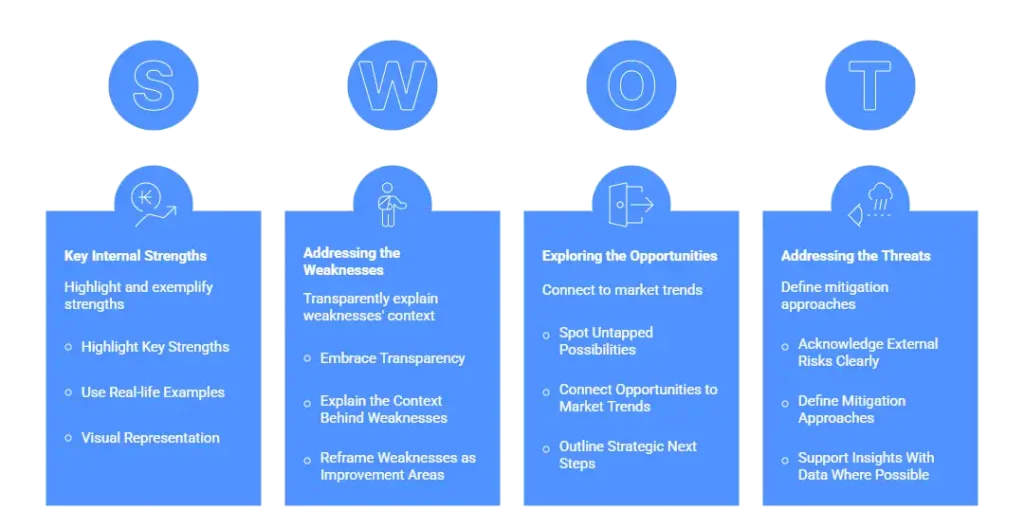
Building an effective SWOT analysis presentation slide requires more than listing points. This is how you reach your goal, which is a combination of clarity, credibility, and direction.
Presenting the Strengths
-
Highlight Key Strengths
Focus on the strengths that directly support your business goals or competitive advantage. These could include brand reputation, unique expertise, strong customer loyalty, or efficient processes. Keep the emphasis on strengths that truly differentiate you, not generic positives.
-
Use Real-life Examples
Concrete examples make strengths more believable and relatable. For instance, instead of saying “strong customer base,” reference repeat purchase rates or long-term client relationships. Real examples help your audience understand how these strengths show up in practice.
-
Visual Representation
Use icons, charts, or simple visuals to reinforce your strengths without adding too much text. Visual cues make the slide easier to scan and help important points stand out. The goal is clarity, not decoration.
Addressing the Weaknesses
-
Embrace Transparency
A strong SWOT presentation acknowledges weaknesses openly rather than avoiding them. This shows self-awareness and builds trust with your audience. Focus on internal factors that genuinely affect performance or growth.
-
Explain the Context Behind Weaknesses
Briefly explain why these weaknesses exist, such as limited resources, skill gaps, or outdated systems. Context helps the audience understand that these challenges are manageable and not overlooked.
-
Reframe Weaknesses as Improvement Areas
Where possible, show how weaknesses are being addressed or could become future strengths. This shifts the conversation from problems to progress and demonstrates a forward-looking mindset.
Exploring the Opportunities
-
Spot Untapped Possibilities
Opportunities often come from changes in the market, customer behavior, or technology. Identify areas where your business can grow, expand, or innovate. These insights should feel realistic and relevant to your current position.
-
Connect Opportunities to Market Trends
Link each opportunity to a visible trend or demand shift. This could include digital adoption, new regulations, or evolving customer expectations. Doing this shows that your analysis is grounded in real-world conditions.
-
Outline Strategic Next Steps
Explain how your organization can act on these opportunities. Whether it’s launching a new product, entering a new market, or forming partnerships, clear action points make opportunities feel achievable.
Addressing the Threats
-
Acknowledge External Risks Clearly
Threats usually come from outside the organization, such as competitors, economic shifts, or regulatory changes. Clearly explain how these factors could impact your business if left unaddressed.
-
Define Mitigation Approaches
For each threat, briefly describe how it can be managed or reduced. This could involve contingency planning, diversification, or process improvements. Showing preparedness helps balance the risk discussion.
-
Support Insights With Data Where Possible
Using market data, competitor benchmarks, or industry reports strengthens your credibility. Even simple statistics can help validate why a threat deserves attention.
Crafting a Compelling Conclusion
-
Recap the Most important Insights
Summarize the key points from strengths, weaknesses, opportunities, and threats without repeating everything. Focus on the insights that should influence decision-making.
-
Reinforce Strategic Priorities
Highlight the actions or strategies that matter most based on the SWOT analysis. This helps the audience understand what to focus on moving forward.
-
End With a Clear Call to Action
Close the slide by guiding your audience on the next step, whether it’s refining a strategy, approving a plan, or exploring an opportunity further. A clear direction makes the SWOT analysis more impactful.
Tips to Present a Swot Analysis Most Effectively
Even strong content can lose impact if the slide design is poor. These practical tips help keep your SWOT analysis presentation slides clean and effective.
-
Keep Each SWOT Box Uncluttered
Limit each section to a few high-impact points. Overcrowding the slide makes it harder for the audience to absorb information quickly.
-
Use Bullet Points for Better Flow
Short bullet points make ideas easier to scan and remember. They also help presenters explain points naturally without reading off the slide.
-
Add Icons to Improve Clarity
Simple icons can help distinguish sections visually and guide attention. They should support understanding, not distract from the message.
-
Choose Colors Thoughtfully
Use contrasting colors to separate sections, but stay consistent with your brand palette. Avoid overly bright or clashing colors that reduce readability.
-
Make Text Easy to Read
Use clean, legible fonts and ensure the text size is large enough to be seen from a distance. Readability always matters more than style.
-
Use Subtle Animations Sparingly
Light animations can help guide attention, but too much movement can feel distracting. The goal is clarity, not decoration.
Best Tools to Create SWOT Analysis Presentation Slides
Choosing the right tool can simplify how you build and update your SWOT content.
-
SlidesAI
SlidesAI helps you turn ideas and text into structured slides quickly. It enables you to easily create a clean swot analysis without starting from scratch.
<SlidesAICTA1 />
-
Prezent AI
Prezent AI focuses on business storytelling and structured layouts, which work well for executive or strategy presentations.
-
PowerPoint
PowerPoint remains a reliable option for custom layouts, detailed formatting, and offline access.
-
Google Slides
Google Slides is ideal for collaboration. Teams can edit together and share swot analysis presentation slides effortlessly.
-
Canva
Canva offers ready-made templates and visual flexibility, which is useful for quick designs or brand-focused presentations.
To conclude, you do not need complex language or crowded visuals to make SWOT slides effective. They work best when you keep your message simple, your structure clean, and your conclusions actionable. Therefore, when you properly understand how to present a swot analysis, the slide becomes a practical decision-making tool.
Frequently Asked Questions (FAQs)
1. How do I make my SWOT analysis presentation engaging?
Use real examples, clean visuals, and explain why each point matters. Asking questions during the presentation also keeps people involved.
2. How many points should I include in each section of the SWOT slide?
Three to five points per section usually works best. This keeps the slide readable and the discussion focused.
3. What is the best layout for a SWOT analysis slide?
A 2×2 grid is the most common and easiest to understand layout for a SWOT slide. Other layouts can work too, if they fit your presentation style.
4. Should I include icons or images in a SWOT slide?
Yes, but keep them small and relevant. Icons should support understanding, not overwhelm the content.
5. Are templates recommended for the SWOT slide, or should I create one from scratch?
Templates save time and ensure structure. Customizing colors and fonts helps keep the SWOT slide aligned with your brand.
6. Should I include examples or data points in the SWOT analysis presentation?
Yes, you can! Short examples or numbers add credibility. They help the audience understand why each point matters.
Related Posts
-

Final year presentations can feel overwhelming, especially when you know it’s one of your last…
-

Presentation aids are tools that speakers use alongside their words and delivery to help get…
-

SlidesAI is a Google Workspace Add-on (think of it like a Chrome Extension but only…
-
{ “@context”: “https://schema.org”, “@type”: “FAQPage”, “mainEntity”: [{ “@type”: “Question”, “name”: “Can I change the slide…